
Data Cable Price in BD
Showing all 2 results
Data Cable Price in BD 2026 – USB Type-C & Fast Charging Cables
Looking for the best data cable price in BD? Explore affordable USB Type-C Cables, Fast Charging Data Cables, Multi-Connector Charging Cables, and Mobile Charging Accessories at ViralMart BD. Whether you need a replacement cable for your smartphone, a convenient charging accessory for everyday use, or a multi-connector cable for compatible devices, compare available products, features, and prices before purchasing.
A Data Cable is used to connect compatible electronic devices for data transfer, charging, or both, depending on the cable’s construction and supported specifications. Different cables use different connectors, charging ratings, and data transfer standards.
At ViralMart BD, you can explore Data Cables and related charging accessories designed for compatible smartphones and other electronic devices. Check the connector type, power rating, and product specifications to choose a suitable cable for your needs.
Data Cable Price in Bangladesh 2026
The data cable price in Bangladesh varies depending on the connector type, brand, supported charging power, cable length, materials, data transfer capabilities, and additional features.
Basic charging cables may be more affordable than cables with multiple connectors or accessories that combine charging functions with an adapter.
ViralMart BD’s current Data Cable category includes products listed from ৳330 to ৳690.
Data Cable Price List in Bangladesh
Compare the current listed products in ViralMart BD’s Data Cable category.
| Data Cable Product | Listed Price |
|---|---|
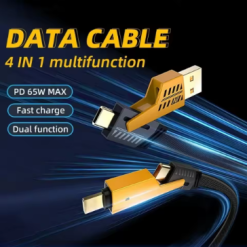
| 65W USB Type-C Cable 4-in-1 PD 27W Fast Charging Data Cable | ৳330 |
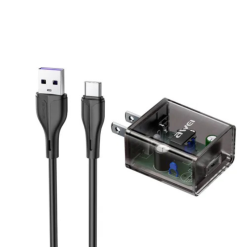
| Awei C11T Fast Charging Type-C Transparent Adapter with 1M Cable | ৳690 |
Note: Prices are based on the product listings reviewed in October 2026 and may change due to offers, stock updates, or other factors. The 65W and 27W figures are advertised in the product title and do not independently establish supported charging performance. Confirm specifications and compatibility before purchasing.
Popular Types of Data Cables in Bangladesh
Data Cables are available in different formats for smartphones, tablets, computers, and other electronic devices.
Understanding these types can help you select the right connection.
1. USB Type-C Data Cable
A USB Type-C Data Cable uses a USB-C connector on one or both ends, depending on the cable design.
USB-C connectors are found on many modern smartphones, tablets, laptops, and electronic accessories.
However, USB-C describes the physical connector rather than a guaranteed charging power or data transfer speed.
Product to Explore: 65W USB Type-C Cable 4-in-1 PD 27W Fast Charging Data Cable.
Before buying, check the actual connector configuration and the charging and data functions supported by your device.
2. Fast Charging Data Cable
Fast Charging Data Cables are designed or marketed to support compatible higher-power charging.
Actual charging speed depends on several components working together:
- Smartphone or device charging capability
- Charger output and supported charging protocol
- Cable current and power rating
- Connector compatibility
- Device battery condition and operating temperature
A cable advertised as 65W does not automatically charge every smartphone at 65W.
Always use appropriately rated and compatible charging equipment.
3. Multi-Connector Charging Cable
A Multi-Connector Cable includes multiple connection options, allowing it to support different compatible devices.
Depending on the product, it may feature USB-C, Micro-USB, Lightning, or other connector types.
Product to Explore: 65W USB Type-C Cable 4-in-1 Fast Charging Data Cable.
Before purchasing, confirm which connectors are included and whether the desired charging and data functions work through each connection.
Some multi-connector cables support charging on several outputs but have limited data transfer functionality.
4. USB-C Charging Adapter with Cable
A Charging Adapter with Cable combines a power adapter and a compatible cable as a product bundle or integrated accessory.
Product to Explore: Awei C11T Fast Charging Type-C Transparent Adapter with 1M Cable.
When comparing charging adapters, review their input voltage, rated output, supported charging standards, plug type, and included cable specifications.
Do not assume an adapter supports every fast charging technology because its product name includes the words “Fast Charging.”
5. USB-A to USB-C Cable
A USB-A to USB-C Cable has a USB-A connector on one end and a USB-C connector on the other.
This configuration is commonly used with compatible chargers, computers, and devices.
Available charging and data capabilities vary among different cables.
Check the ports and requirements of your intended devices before purchasing.
6. USB-C to USB-C Cable
A USB-C to USB-C Cable has USB-C connectors on both ends.
This configuration is commonly used with compatible smartphones, tablets, laptops, power banks, and USB-C chargers.
However, not every USB-C to USB-C cable supports high-power laptop charging, high-speed data transfer, or video output.
Check the cable’s documented USB data standard, power rating, and additional features.
7. Lightning Charging Cable
Lightning Cables use Apple’s Lightning connector, which is found on various earlier iPhone models and other compatible Apple devices.
Different cables may use USB-A to Lightning or USB-C to Lightning connections.
Check compatibility with your exact iPhone or accessory.
For third-party Lightning accessories, review applicable manufacturer certification and compatibility information where available.
8. Micro-USB Data Cable
Micro-USB Cables are used with many older smartphones and electronic accessories.
These cables may support charging and data transfer depending on their design.
Before purchasing, verify the connector shape, charging requirements, and compatibility with your device.
Best Data Cable Under 1000 Taka in Bangladesh
If you are looking for a data cable under 1000 taka, ViralMart BD currently lists two products within this budget.
| Product | Listed Price | Main Consideration |
|---|---|---|
| 65W USB Type-C 4-in-1 Cable | ৳330 | Multi-connector design and advertised fast charging |
| Awei C11T Type-C Adapter with 1M Cable | ৳690 | Charging adapter with included cable |
The products serve somewhat different purposes.
If you already have a compatible charger and need a replacement cable, review the 4-in-1 Data Cable.
If you need a charging adapter together with a cable, compare the Awei C11T product’s specifications with your device requirements.
How to Choose the Best Data Cable for Your Device
Different devices have different charging and connection requirements.
| Your Needs | Cable or Accessory to Consider |
|---|---|
| USB-C smartphone charging | Compatible USB-C Cable |
| Fast charging | Cable and charger supporting the device’s charging protocol |
| Connecting multiple compatible connector types | Multi-Connector Cable |
| Laptop charging via USB-C | Appropriately rated USB-C cable and compatible USB-C PD charger |
| Transferring files between devices | Cable with verified data transfer support |
| Using an older Micro-USB device | Micro-USB Cable |
| Charging an older Lightning iPhone | Compatible Lightning Cable |
| Replacing both charger and cable | Compatible Charging Adapter and Cable Set |
Choose according to the exact device and connection requirements rather than relying only on advertised wattage.
7 Important Things to Consider Before Buying a Data Cable
1. Connector Compatibility
Check whether your device requires USB-C, Lightning, Micro-USB, or another connector.
Do not force an incompatible connector into a device port.
Also check the connector on the other end to ensure it works with your charger or computer.
2. Charging Power and Current Rating
Some cables support higher charging currents or power levels than others.
Power is related to voltage and current:
Power (Watts) = Voltage (Volts) × Current (Amperes)
However, real-world charging also depends on supported charging protocols and power negotiation.
Use compatible equipment with documented ratings.
3. Data Transfer Speed
Not all charging cables support the same data transfer capabilities.
Some USB cables are designed for basic data rates, while others support faster transfers.
For reference:
- USB 2.0 High-Speed supports signaling up to 480 Mbps.
- USB 5Gbps supports a nominal signaling rate up to 5 Gbps.
- USB 10Gbps supports a nominal signaling rate up to 10 Gbps.
Actual file transfer speed can be lower due to the connected devices, storage, protocol overhead, and cable capabilities.
4. Cable Length
Cable length affects convenience, portability, and placement.
Shorter cables may be easier to carry, while longer cables can provide additional flexibility when charging.
However, the effect on charging performance depends on cable construction, resistance, and supported specifications.
Choose a suitable length for your intended use.
5. Cable Materials and Durability
Cables may have PVC, silicone, braided nylon, or other outer coverings.
Actual durability depends on construction, connector strain relief, bending conditions, and quality.
A braided exterior does not automatically guarantee a longer lifespan.
6. Charging Safety and Compatibility
Poorly constructed, damaged, or unsuitable cables can create charging and reliability problems.
Avoid using cables with exposed wiring, damaged connectors, excessive heat, or other visible defects.
For higher-power USB-C applications, check that the cable is appropriately rated and identifiable for the required function.
7. Price, Warranty, and Product Authenticity
Compare the price with documented charging specifications, data capabilities, connector type, length, and materials.
For branded products, review the model details and any available authenticity verification.
Check applicable warranty and return conditions before ordering.
USB-C vs Micro-USB vs Lightning Cable
USB-C, Micro-USB, and Lightning connectors have different designs and compatibility requirements.
| Feature | USB-C | Micro-USB | Lightning |
|---|---|---|---|
| Connector Shape | Symmetrical and reversible | Asymmetrical | Reversible |
| Common Devices | Many modern phones, tablets, and laptops | Many older electronic devices | Various earlier Apple devices |
| Charging Power | Depends on cable, charger and device | Depends on implementation | Depends on implementation |
| Data Transfer | Depends on supported standard | Depends on supported standard | Depends on device and implementation |
| Compatibility | USB-C ports | Micro-USB ports | Lightning ports |
The best connector is the one supported by your specific device.
USB-A to USB-C vs USB-C to USB-C
USB-A to USB-C and USB-C to USB-C cables are both common, but their connection types differ.
| Feature | USB-A to USB-C | USB-C to USB-C |
|---|---|---|
| Charger-Side Connector | USB-A | USB-C |
| Device-Side Connector | USB-C | USB-C |
| Common Uses | Compatible older chargers and computers | Compatible USB-C chargers and devices |
| Power Capability | Depends on implementation | Depends on cable and USB-C power support |
| Data Capability | Model-dependent | Model-dependent |
| Best Choice | When one device has USB-A | When both devices use USB-C |
Do not assume that every USB-C to USB-C cable supports USB Power Delivery or the same data transfer speeds.
Fast Charging Cable vs Normal Charging Cable
Fast Charging Cables and ordinary charging cables may differ in supported power ratings.
| Feature | Fast Charging Cable | Standard Charging Cable |
|---|---|---|
| Advertised Power | Often supports higher compatible ratings | Depends on design |
| Charging Speed | Depends on full charging setup | Depends on full charging setup |
| Data Transfer | Model-dependent | Model-dependent |
| Device Compatibility | Requires suitable connection and protocol | Requires suitable connection |
| Price | Varies | Varies |
| Main Consideration | Verified power capability | Suitable everyday compatibility |
A cable alone cannot guarantee fast charging.
Charging Cable vs Data Cable – What’s the Difference?
Charging Cables are designed to carry electrical power, while Data Cables support appropriate data signals.
Many USB cables support both charging and data transfer.
However, some cables are designed for charging only.
Before purchasing, confirm whether the exact cable supports file transfer, particularly if you intend to connect your smartphone to a laptop for photos, documents, backups, or other data.
What Does PD Mean in a USB-C Cable?
PD stands for USB Power Delivery, a standard used for negotiating compatible electrical power over supported USB connections.
USB PD allows compatible chargers and devices to negotiate suitable power levels.
However, a product title that includes “PD” does not establish full compatibility with every USB PD charger or device.
Always verify the specifications of the charger, cable, and connected device.
What Is an E-Marker Chip in a USB-C Cable?
An Electronically Marked Cable, commonly called an E-Marked Cable, contains identification information that compatible equipment can use to determine certain cable capabilities.
E-Marking is relevant for particular USB-C cable configurations and higher-current or higher-performance applications.
It does not independently control the entire charging process or guarantee that a device will charge at its maximum advertised power.
When purchasing a high-power USB-C cable, check the cable’s verified current and power rating and applicable USB certification information.
How to Choose a Fast Charging Cable for Android or iPhone
Choosing the right Fast Charging Cable depends on the exact device.
For Android Smartphones
Check whether your smartphone uses USB-C or another connector.
Then review the phone’s supported charging standards and the charger requirements.
For iPhones with USB-C
Use a compatible USB-C cable and suitable power adapter.
The supported charging rate depends on the iPhone model and complete charging setup.
For iPhones with Lightning
Use a compatible Lightning cable and suitable charger.
Review manufacturer guidance for approved accessories and charging compatibility.
For Tablets and Laptops
Check whether the device supports charging over USB-C and what power it requires.
A cable intended for basic smartphone charging may not be appropriate for a laptop.
How to Check Whether a Data Cable Supports File Transfer
If you need to transfer files between your phone and computer, follow this general process:
- Check whether the cable is documented to support data transfer.
- Connect the cable to compatible ports.
- Unlock your phone if required.
- Review any USB connection options presented by the phone.
- Select an appropriate file transfer mode if supported.
- Check whether the computer detects the connected device.
- Test with a small file.
If the connection does not work, inspect the cable and consult the device manufacturer’s instructions.
Do not assume that an unsuccessful connection proves the cable is defective; the issue may also involve settings, drivers, ports, or device compatibility.
How to Maintain a Data Cable
Proper handling can help keep your charging accessories in good condition.
- Hold the connector rather than pulling on the cable.
- Avoid sharply bending the cable near its connectors.
- Keep connectors clean and dry.
- Do not use damaged cables or chargers.
- Avoid exposing cables to excessive heat.
- Store cables without excessive twisting or tension.
- Use appropriate charging equipment.
- Replace cables showing exposed wiring or electrical damage.
Stop using a cable if it becomes unusually hot, sparks, or shows other signs of electrical failure.
Why Explore Data Cables at ViralMart BD?
At ViralMart BD, customers can explore Data Cables and Mobile Charging Accessories through our Mobiles & Computers collection.
Our current Data Cable category includes a Multi-Connector USB Type-C Fast Charging Cable and an Awei C11T Charging Adapter with Cable.
Compare product images, current prices, connector types, and available specifications before selecting a charging accessory.
You can also explore our Mobiles & Computers collection for phone stands, tripods, charging accessories, and other useful gadgets.
Before placing an order, check product availability, delivery information, payment options, and applicable warranty or return conditions.
Frequently Asked Questions About Data Cable Price in BD
1. What is the data cable price in BD?
Data Cable prices vary by brand, connector type, charging specifications, data transfer capability, and construction. ViralMart BD currently lists two products in its Data Cable category priced at ৳330 and ৳690.
2. What is the Type-C data cable price in Bangladesh?
ViralMart BD currently lists a 65W USB Type-C 4-in-1 Fast Charging Data Cable at ৳330. Confirm its exact supported functions and current price before purchasing.
3. What is the fast charging cable price in BD?
Fast Charging Cable prices depend on the cable’s supported power, connectors, brand, and design. ViralMart BD lists a 4-in-1 Type-C cable at ৳330 and an Awei C11T Charging Adapter with Cable at ৳690.
4. Which data cable is best for Android phones?
The most suitable cable depends on your Android phone’s connector and charging specifications. Choose a compatible cable with the required charging and data functions.
5. Which cable should I use for an iPhone?
The correct cable depends on the iPhone model. Some iPhones use Lightning, while newer models use USB-C. Check the exact device specifications.
6. Can I charge a laptop with a Type-C data cable?
Some laptops support USB-C charging. You need a compatible charger, appropriately rated cable, and a laptop that supports the relevant charging standard.
7. Does a 65W cable charge every phone at 65W?
No. The actual charging rate depends on the phone, charger, cable, charging protocol, and operating conditions.
8. What is the difference between a charging cable and a data cable?
A Charging Cable carries electrical power, while a Data Cable supports data transfer. Many USB cables support both, but some are charging-only.
9. Does cable length affect charging speed?
It can. Longer cables may have greater electrical resistance, but the practical effect depends on their construction, current rating, and overall charging setup.
10. Is a braided cable better than a regular cable?
A braided outer covering may provide different handling or abrasion characteristics, but durability depends on the entire cable design and manufacturing quality.
11. What is USB Power Delivery?
USB Power Delivery is a standard that allows compatible devices and chargers to negotiate electrical power over supported USB connections.
12. Can every USB-C cable transfer files?
No. Some USB-C cables are charging-only, while others support different data transfer speeds. Check the exact cable specifications.
13. Is USB-C the same as fast charging?
No. USB-C refers to a connector design. Charging speed depends on the charger, cable, device, and supported protocol.
14. What should I check before buying a mobile charging cable?
Check the connector type, supported current and power, data transfer capabilities, cable length, manufacturer information, current price, and applicable warranty.
15. Where can I buy data cables online in Bangladesh?
You can explore USB Type-C Data Cables and related charging accessories at ViralMart BD. Compare current product listings and device compatibility before ordering.
Explore More Mobile Accessories & Buying Guides
Discover related products and useful information:
- Mobile and Computer Accessories Price in Bangladesh
- USB Type-C Cable Price in BD
- Fast Charging Cable Buying Guide
- USB-C vs Micro-USB vs Lightning Cable
- USB-A to USB-C vs USB-C to USB-C
- Charging Cable vs Data Cable
- How to Choose a Fast Charging Cable for Android
- How to Identify a USB-C Data Transfer Cable
- USB Power Delivery Explained
- How to Maintain Mobile Charging Cables
Explore ViralMart BD’s Data Cable Collection to compare current prices, review compatibility information, and find suitable charging accessories for your devices.